As a projector, the Benq MP780 ST combines DLP technology with a resolution of WXGA 1280 x 800, and is additionally specified with 2500 ANSI lumens and a contrast of 3000:1. According to Benq, the included lamp lasts up to 3000 hours. The short-throw capabilities allow for large images at a short projection distance. According to specifications, a 2-meter wide image requires a distance of only 98 cm. A look at the light output reveals: The 2500 ANSI lumens are sufficient to illuminate an image width of up to 508 cm in darkened rooms. If room light is present, we recommend not exceeding a maximum width of 339 cm. Regarding signal processing, the model is compatible with incoming 1080P content. As an additional feature, an integrated media player enables the direct playback of files without an external source device. For integration into professional environments, an RJ45 connection is available for network control and remote maintenance. Equipped with a microphone jack and built-in speakers (10W), audio signals during presentations can be played back directly without an external audio system. A look at the data sheet confirms a very subtle fan noise for the projector at just 30 decibels. The projector was released in 2010 and is officially no longer distributed by Benq. However, it remains frequently searched within our database.
Display Type
1 x DLP Chip WXGA 16/10 Ti Digital Light Processing Chip
Ansi-Lumen
Projector
2500
Screen
1000 Lux (200 cm Screen width)
Contrast
3000:1 full on/off
3000:1 full on/off
Black Level
0,8333 min. Lumen
0,334 min. Lumen
Offset
65% 19 cm over screen top edge →
SCREEN
+Projector
Resolution
WXGA 1280 x 800
1.024.000 Pixel
Video Modes
PAL, SECAM, NTSC, HDTV 720p, 1080i, 1080p EDTV 480p, 576p Media player formats: JPEG, GIF, TIFF, PNG und BMP
Disc Recognition
DVD | HD Blu-ray (komprimiert) | 3D Blu-ray | 4K UHD Blu-ray
3D Compatibility
Frame Sequential (3D Ready) |
Application
Short Distance | Medium screen width or rooms with little light, max. 100 lumens.
Calculated brightness quality The screen width may also be larger. Perfect
98 cm (no Zoom)
Lux:
1000 Lux
Contrast:
3000:1
Candela pro m²:
319 cd/m²
Foot-Lamberts:
93 fL
81 cm
•
Focus
Manual
Zoom
No Zoom
Objective
F=2,6 f=6,9mm
Throw Ratio
0,49:1
Audio
2 x 10W Stereo
Connections
HDMI 1.3 in
D-sub 15 pin in und out
S-Video in
Cinch Video in
Cinch Stereo in
USB Typ B, A
Mini jack audio in und out
Mikrofon in
RS232C Din 9 pin in
RJ45 in
Ceiling Mounting
Yes, is possible.
Power
280W / 1W standby
Size WxHxD
329,5 x 130 x 248,5 mm (13"x5,1"x9,8") 10,61 L/dm³
Full HD 1080P compatible Integrated Mediaplayer Freeze Blank (Black screen button) Blackboard Modus User logo Eco Mode Kensington Slot sRGB Password protection BrilliantColor™ Remote control with laser pointer PJLink™ Control via web browser Optional Wi-Fi network compatible. Lan network compatible. Short-throw projector Crestron®-Software compatible. Digital Zoom 6 Segment colour wheel
The installation is not quite as simple as the manufacturer claims!
It starts with the manual.
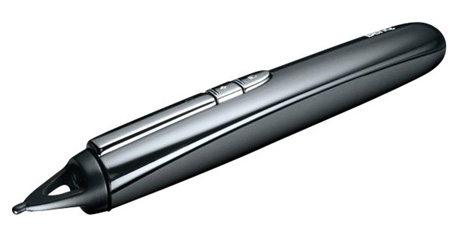
To use the interactive pen, it is described on page 66 that you should use the USBA and B cable (included).
Later you should determine the source (with the help of the remote control). You are supposed to set RGB1 or RGB2 or HDMI... but since the projector was previously connected via a USB cable, only the BenQ menu can appear with the information "Source not found"
If I use the VGA cable, the image appears in a different format... Images and displays are distorted and unattractive
Unfortunately, the interactive PointDraw pen has not yet worked either. There is no "off switch" for the pen and since it is charged via a rechargeable battery, it then has a function time of 35 hours until the next recharge... this is a real imposition without an off switch on the pen - without use it was empty again after 2 days and it had to be recharged again for 2.5 hours.
I hope that the pen will work once - but maybe I‘m just too stupid for the whole system...
I wonder if it only works with this QDraw software, which can only be used 30 times without registration. There‘s nothing written about it anywhere.
The pen is only supposed to work when it‘s not in the shade... (laugh!) when the projector is in front mode and you want to draw a line on the projection screen, the pen always casts a shadow (unfortunately I was never able to set the pen to the position without a shadow, as stated in the instructions... there is ALWAYS a shadow, no matter how I hold it!) So I‘m really annoyed and will wait a maximum of one more day until the service department replies to me, perhaps by e-mail. Then I‘ll make use of my right of return and finally get rid of the hassle
Badest rating in terms of user-friendliness and description in the manual!






 Full HD 1080P compatible




 Benq Website
 Product Sheet english


