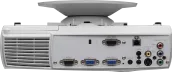
The projector PD112 by Acer utilizes DLP technology and, according to the spec sheet, achieves 1300 ANSI lumens, a contrast of 2000:1 at a resolution of SVGA 800 x 600. According to Acer, the lamp has a durability of 2000 hours. A look at the light output reveals: The 1300 ANSI lumens are sufficient to illuminate an image width of up to 314 cm in darkened rooms. If room light is present, we recommend not exceeding a maximum width of 209 cm. This model dates back to 2004 and is no longer part of Acer's current product range.
Display Type
1 x 0,55" DDR DLP Chip SVGA 4/3 Ti Digital Light Processing Chip
Ansi-Lumen
Projector
1300
Screen
433 Lux (200 cm Screen width)
Contrast
2000:1 full on/off
2000:1 full on/off
Black Level
0,6500 min. Lumen
0,217 min. Lumen
Offset
-
Resolution
SVGA 800 x 600
480.000 Pixel
SXGA 1280×1024 compressed
Standard-Portabel | External training and company presentations, as well as product presentations. Small screen width, rooms with very little ambient light below 50 lumens.
As a rule, it is possible to connect the projector to a television... The prerequisite is of course that the TV outputs its signal somewhere. All TVs simply do this, e.g. for a video/DVD/BluRay recorder... then all you really need is a proper cable, e.g. from Scart (out on the TV) to video (Cinch in money) on the projector or to S-Video, the multi-pin round on the projector. If the TV (usually newer models) only outputs HDMI, you would have to buy a converter for the PD112, e.g. from Amazon (for approx. 50-60€), but this is still not HD in the sense...
But there is a lot that can be done...
The easiest way to watch TV via beamer is actually if you have an external receiver for the TV signal such as an IP-TV box (like me, for example) or SAT receiver, DVB-T, DVB-C (i.e. cable) or a set-top box from your trusted telecommunications provider, etc... They always have enough OUTPUTS on offer...
Autor:
RukkelGott 15.08.11
5
Stars
Top projector at a fair price! Perfect for beginners
I bought the Acer PD 112 for about 220 € on Ebay + then a motorized screen for 110 € and I have to say it‘s the perfect home cinema for the money...
In my opinion, the projector is ideal for cinema evenings, Xbox or PC gaming without any major restrictions. The resolution is absolutely sufficient and the picture speed or reaction time is also absolutely adequate. I‘ve never had the feeling that the projector doesn‘t build up the images quickly enough or that something is lagging, e.g. the ball in soccer or similar (as with some plasmas) It always recognizes the signals very quickly and doesn‘t cut anything off in the rules. As with a monitor, you can move the image slightly in all directions in order to select the optimal image section. The only drawback is - in my opinion - the somewhat low Ansi lumen - i.e. the brightness. During the World Cup, which took place during the day in summer, the brightness was a bit too low to be able to watch TV properly without having to hang the windows down... and in some VERY dark scenes in gloomy first-person shooters, the contrast could be stronger... But if you get to grips with the projector a little, you can set different brightness levels, contrasts, gamma etc. for the respective source - Xbox - IPTV box - DVD or even PC - so that it‘s actually always a lot of fun to work with this projector
It‘s easy to switch between the inputs using the remote control, even if all sources are occupied. Sometimes it takes a little while to find the source but then...
The picture can be optimally rotated, mirrored and adjusted as you need it.
I find it very quiet for a projector that doesn‘t get on your nerves even during long gaming sessions. I‘ve experienced others in this respect.
The accessories are very extensive and complete for me. With the bag, it is also perfect for presentations at university thanks to its low weight!
In the long run, the projector is only missing FullHD (i.e. 1080p) and an HDMI input.
Have fun with it!!!
Autor:
Benny 06.04.10
4
Stars
Acer pd 112
I don‘t know what the problem is I can‘t get a sharp picture, could it be that the lamp is used up or I‘m too far away with the projector, can someone help me because it‘s annoying when gaming because the contrast isn‘t good either
Autor:
Soulfly 06.05.08
5
Stars
answer to questions
simply connect the beamer via scart to the video or dvd recorder if available if there is a dvd recorder connect via s-video cable better picture if connected via scart use the scart plug with the three chinch jacks buy video cable and plug each into the yellow chinch connectors run sound via the beamer if desired otherwise via the system
Autor:
Lesky Günter 17.03.08
5
Stars
Question
Can I connect my PD 112 projector to a TV set? What do I have to do?
Thanks for your help
MfG Günter Lesky
Autor:
Cyris 15.03.06
4
Stars
Question about PD112
Hello,Is it possible to connect the PD 112 to the TV (for the World Cup),if so how and with which cable.
Mfg.Angelika















 Freeze





 Acer Website
 Product Sheet